iOS setup
OAuth, plist/json downloads, and file paths: Google Cloud & config files.
Quick checklist
| Step | Why | |
|---|---|---|
| iOS OAuth client (bundle ID) | Required | Registers your app with Google |
URL scheme (REVERSED_CLIENT_ID) | Required | OAuth redirect must open your app |
GoogleService-Info.plist | Required for autoDetect | Supplies WEB_CLIENT_ID to native code |
bundle exec pod install --project-directory="ios" | Required | Links GoogleSignIn CocoaPod (from app root) |
AppDelegate / SceneDelegate GIDSignIn.sharedInstance.handle(url) | Optional (Expo) · Recommended (bare RN) · Required (scenes, multiple URL handlers, or stuck redirect) | Forwards OAuth URL to GIDSignIn; required in SceneDelegate when adopting UIKit scene lifecycle — see AppDelegate / SceneDelegate |
iosClientId in configure() | Optional | Usually inferred from plist |
OAuth client
Why: iOS sign-in is tied to your bundle identifier. Google issues tokens only for registered iOS clients.
- Create an iOS OAuth client with your bundle identifier.
- Download GoogleService-Info.plist or note the iOS client ID and REVERSED_CLIENT_ID.
GoogleService-Info.plist
Add plist to Xcode
autoDetectWhy: Native code reads WEB_CLIENT_ID from the plist when webClientId is 'autoDetect'.
webClientId onlyWhy optional for client ID: You can pass webClientId in JS. You still need the URL scheme below — the plist is the easiest source for REVERSED_CLIENT_ID.
- Add
GoogleService-Info.plistto your Xcode project (drag into the app target, “Copy items if needed”). Get the file. - For
webClientId: 'autoDetect', ensure the plist containsWEB_CLIENT_ID(Firebase-linked projects include this).
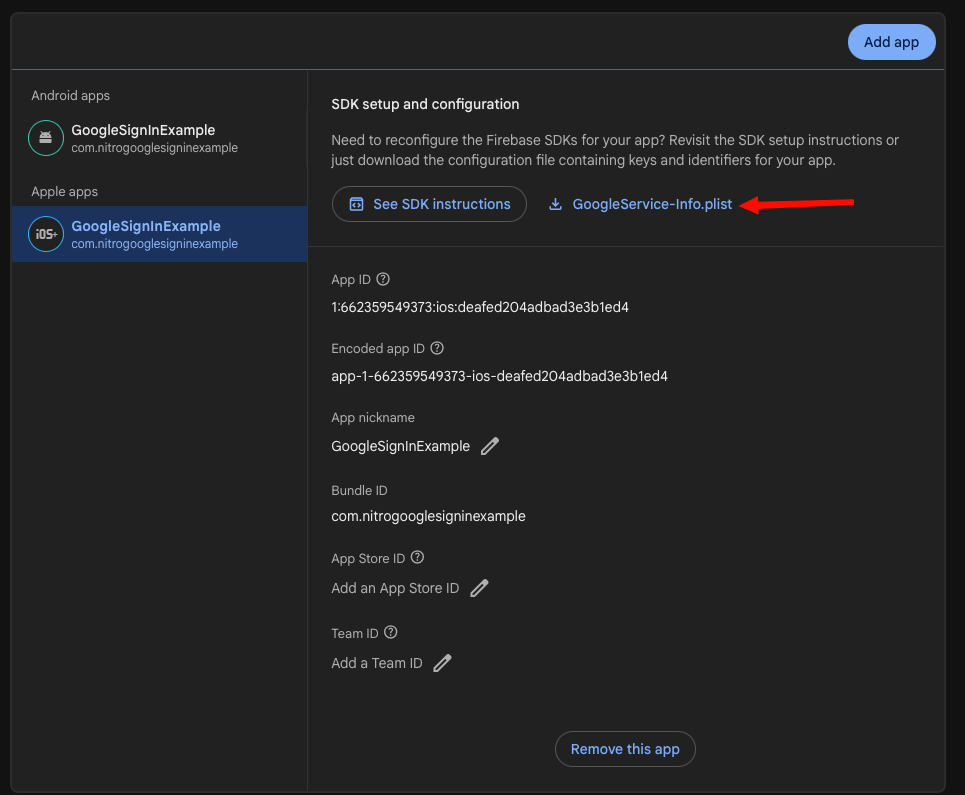

GoogleOneTapSignIn.configure({ webClientId: 'autoDetect' })
Or pass the Web client ID explicitly:
GoogleOneTapSignIn.configure({
  webClientId: 'YOUR_WEB_CLIENT_ID.apps.googleusercontent.com',
})
URL scheme
Why: After Safari or ASWebAuthenticationSession completes, iOS opens your app via a custom URL. Without a matching scheme, the OAuth flow never completes, and the Google Sign-In SDK will crash immediately on button tap.
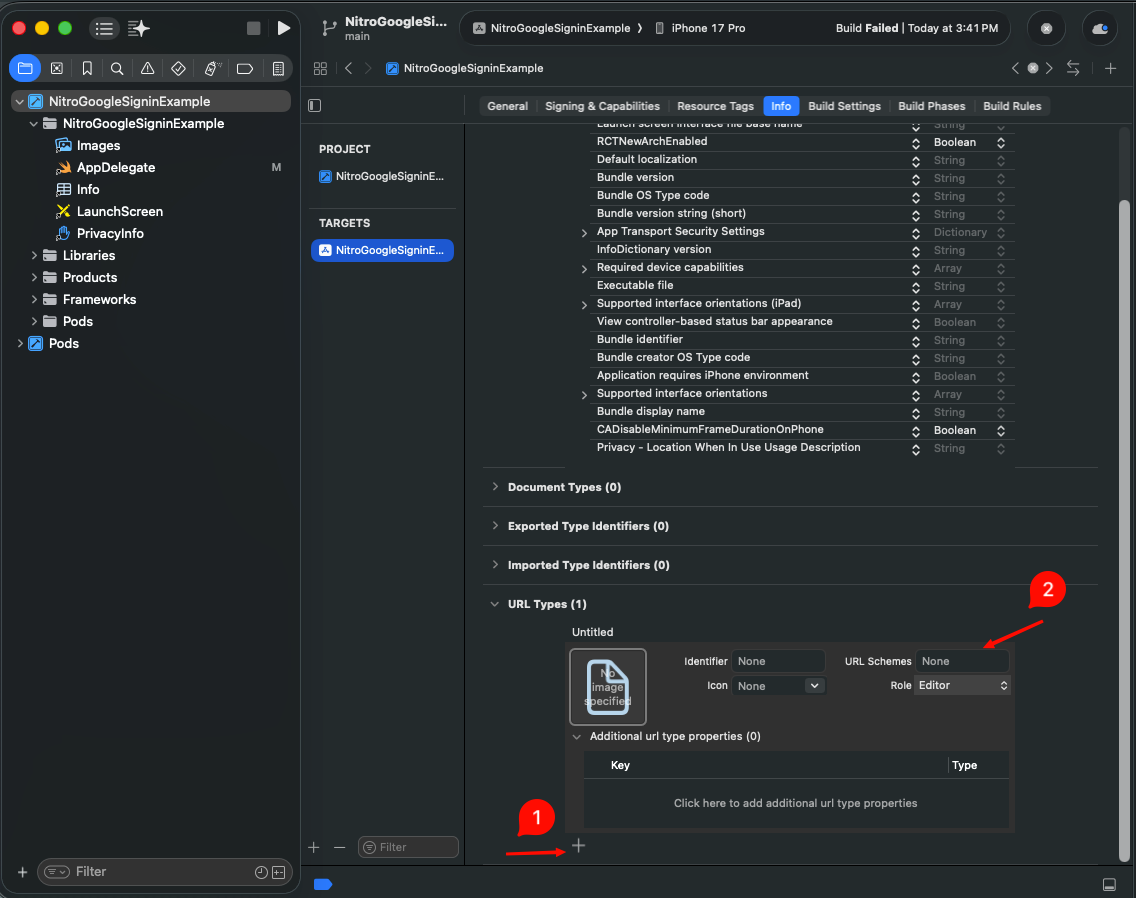
Use the REVERSED_CLIENT_ID from GoogleService-Info.plist (format: com.googleusercontent.apps.XXXX).
URL schemes must be registered statically with the iOS operating system via the Info.plist during app installation so that iOS knows how to route the browser redirect link back into your app. Since iOS does not support dynamic URL scheme registration at runtime, this must be manually configured in your project settings.
Xcode
- Open your app target → Info → URL Types.
- Add a URL scheme with the reversed client ID value.
Info.plist example
<key>CFBundleURLTypes</key>
<array>
  <dict>
    <key>CFBundleURLSchemes</key>
    <array>
      <string>com.googleusercontent.apps.YOUR_CLIENT_ID_SUFFIX</string>
    </array>
  </dict>
</array>
Expo
Why: The config plugin adds the URL scheme from GoogleService-Info.plist or iosUrlScheme. You only need the AppDelegate step if sign-in stalls or you use other URL handlers — see Expo setup.
AppDelegate / SceneDelegate: handle OAuth redirect URLs
After Google Sign-In opens Safari or an in-app browser, iOS returns to your app via the reversed client ID URL scheme. The native SDK must receive that URL through GIDSignIn.sharedInstance.handle(url).
Reference: iOS setup — URL handling.
| Situation | Why | |
|---|---|---|
Apps adopting UIKit Scene Lifecycle (UISceneDelegate) | Required in SceneDelegate | iOS stops calling application(_:open:options:) once scenes are adopted; redirects must be handled in scene(_:openURLContexts:) |
| Expo — only Google Sign-In, URL scheme from plugin | Optional | Prebuild often registers the scheme; many apps work without editing AppDelegate |
Expo — Scene Lifecycle (enableSceneSupport / SDK 57+) or multiple URL handlers | Required | Handle in SceneDelegate when scenes are adopted (Expo scene setup) or chain handlers in AppDelegate |
| Bare RN — interactive sign-in (Safari / account UI) | Recommended | RN 0.77+ templates often ship without application(_:open:options:) — redirects never reach GIDSignIn |
Bare RN — multiple openURL handlers | Required | iOS calls one handler; you must chain with || |
| Sign-in stuck after browser on any stack | Required | Missing handle(url) is a common cause |
Some guides label this step optional when Google is your only URL handler. That assumes your app already implements openURL. Bare React Native 0.77+ often does not — so we recommend adding handle(url) even with a single handler. It becomes required when another SDK also handles URLs, when sign-in never returns after OAuth, or when your app uses SceneDelegate.
Rebuild the native app after changing native delegates.
UIKit Scene-Based Life Cycle (SceneDelegate.swift)
When your app adopts Apple's UIKit scene-based life cycle (UIApplicationSceneManifest), UIKit stops calling application(_:open:options:) in AppDelegate. You must pass incoming URLs to Google Sign-In in SceneDelegate. For Expo apps using expo-build-properties (enableSceneSupport), see Expo UIKit Scene Lifecycle.
import GoogleSignIn
import UIKit

class SceneDelegate: UIResponder, UIWindowSceneDelegate {
  var window: UIWindow?

  // Handle URL redirect while app is running / foregrounded
  func scene(_ scene: UIScene, openURLContexts URLContexts: Set<UIOpenURLContext>) {
    if let url = URLContexts.first?.url {
      _ = GIDSignIn.sharedInstance.handle(url)
    }
  }

  // Handle cold launch via URL redirect
  func scene(
    _ scene: UIScene,
    willConnectTo session: UISceneSession,
    options connectionOptions: UIScene.ConnectionOptions
  ) {
    if let url = connectionOptions.urlContexts.first?.url {
      _ = GIDSignIn.sharedInstance.handle(url)
    }
  }
}
Objective-C (SceneDelegate.m)
#import <GoogleSignIn/GoogleSignIn.h>

- (void)scene:(UIScene *)scene openURLContexts:(NSSet<UIOpenURLContext *> *)URLContexts {
  NSURL *url = URLContexts.anyObject.URL;
  if (url != nil) {
    [GIDSignIn.sharedInstance handleURL:url];
  }
}
Swift (AppDelegate.swift) — Apps without SceneDelegate
Add the method below when you use bare RN without SceneDelegate, when sign-in stalls after the browser, or when you share openURL with Facebook, React Navigation linking, etc. Skip on Expo if the config plugin URL scheme alone works for you.
import GoogleSignIn

@main
class AppDelegate: UIResponder, UIApplicationDelegate {
  // … existing didFinishLaunchingWithOptions …

  func application(
    _ app: UIApplication,
    open url: URL,
    options: [UIApplication.OpenURLOptionsKey: Any] = [:]
  ) -> Bool {
    // Chain other SDKs first if needed, e.g. Facebook:
    // return FBSDKApplicationDelegate.sharedInstance.application(app, open: url, options: options)
    //   || GIDSignIn.sharedInstance.handle(url)
    return GIDSignIn.sharedInstance.handle(url)
  }
}
See example/ios/NitroGoogleSigninExample/AppDelegate.swift in this repo.
Objective-C projects import #import <GoogleSignIn/GoogleSignIn.h> in the bridging header. Swift apps can import GoogleSignIn directly when the CocoaPod is installed.
Objective-C (AppDelegate.mm) — Apps without SceneDelegate
#import <GoogleSignIn/GoogleSignIn.h>

- (BOOL)application:(UIApplication *)application
            openURL:(nonnull NSURL *)url
            options:(nonnull NSDictionary<NSString *, id> *)options {
  return [GIDSignIn.sharedInstance handleURL:url];
}
CocoaPods
Why: Google Sign-In ships as a native iOS dependency; without installing pods the Xcode project will not link GoogleSignIn.
From your app project root (not inside ios/):
bundle exec pod install --project-directory="ios"
Run bundle install once if your project has a Gemfile. The pod pulls GoogleSignIn (~> 10.x) transitively.
iosClientId in configure
Why optional: The iOS client ID is usually read from GoogleService-Info.plist or inferred when using autoDetect. Set explicitly only if you split config across projects or omit the plist.
GoogleOneTapSignIn.configure({
  webClientId: 'autoDetect',
  iosClientId: 'YOUR_IOS_CLIENT_ID.apps.googleusercontent.com',
})
Troubleshooting
| Issue | Fix |
|---|---|
| URL scheme / redirect errors | Verify REVERSED_CLIENT_ID matches Info.plist URL scheme |
| Sign-in UI never returns / stuck after browser | Add GIDSignIn.sharedInstance.handle(url) in AppDelegate (see above) |
autoDetect fails | Add WEB_CLIENT_ID to plist or pass explicit webClientId |
| Build errors after upgrade | bundle exec pod install --project-directory="ios", clean build folder |
See Troubleshooting.