Expo setup
This library uses native code (Nitro + Google Sign-In SDK). It does not run in Expo Go.
Why: Expo Go does not include this native module. You need a development build with expo-dev-client.
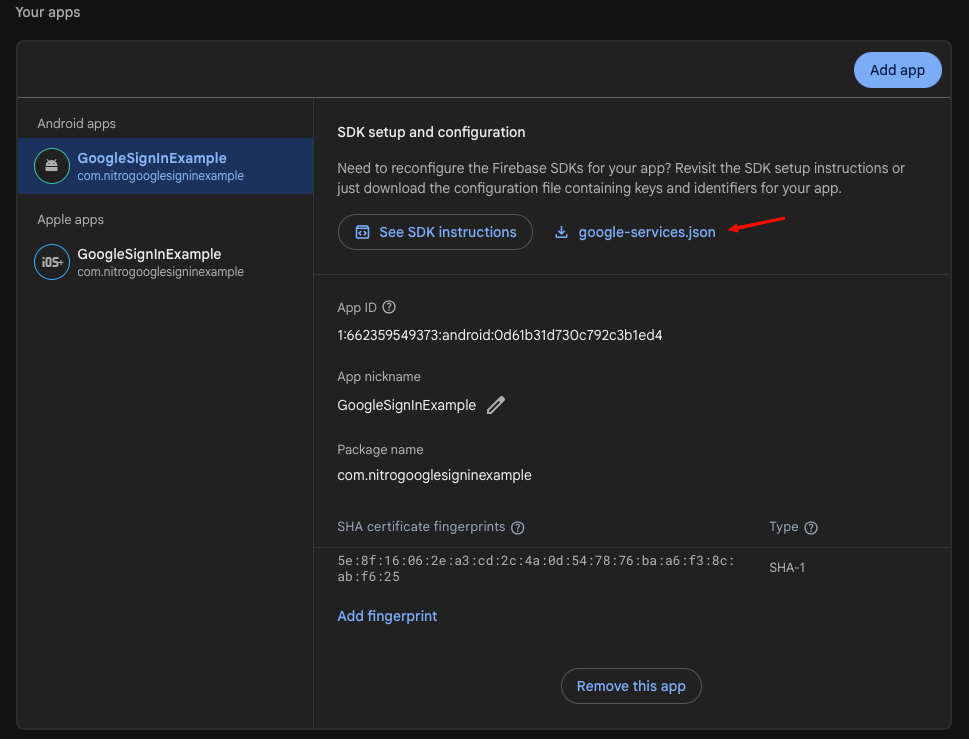
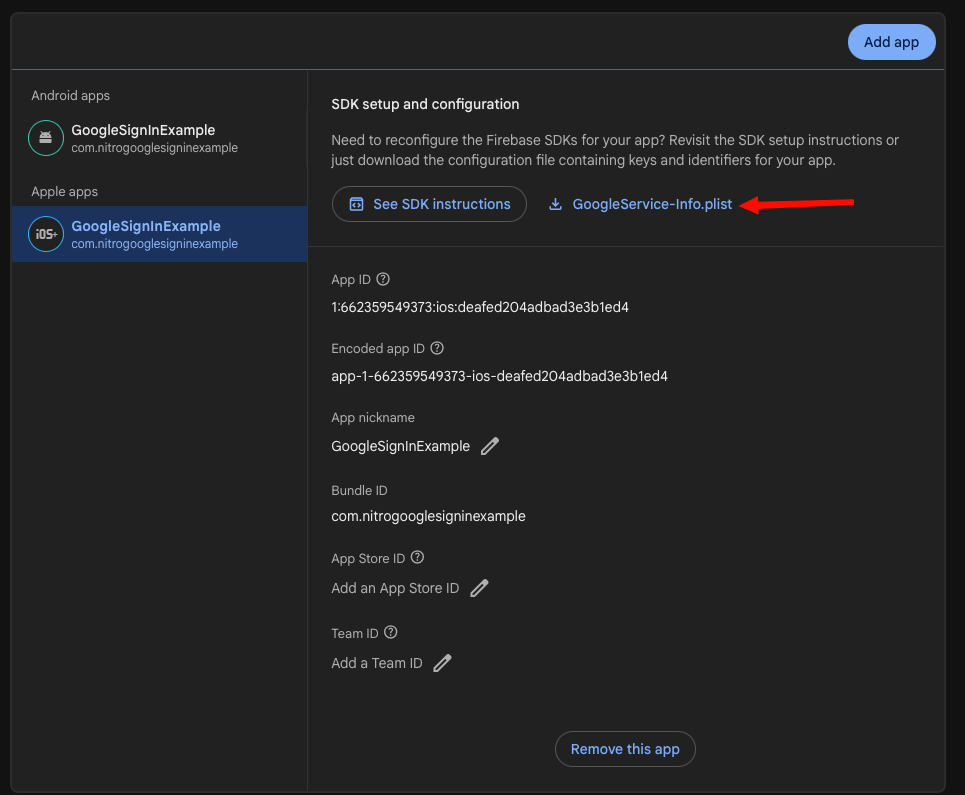
Expo uses the same google-services.json and GoogleService-Info.plist as bare React Native. See Google Cloud & config files for OAuth, Firebase download, SHA-1, and file paths.
Quick checklist
| Step | Why | |
|---|---|---|
expo-dev-client | Required | Custom native binary with Nitro modules |
Config plugin in app.config | Required | Wires native Google Sign-In + URL scheme |
googleServicesFile paths | Required for autoDetect | Plugin copies JSON/plist and applies Android Gradle |
expo prebuild | Required after native config changes | Generates ios/ / android/ with plugin output |
expo run:ios / expo run:android | Required | Rebuilds dev client (not Metro-only refresh) |
| Manual Gradle edits | Optional | Plugin applies Google Services for you |
enableSceneSupport (iOS 27 / Xcode 27) | Required for SDK 57 on iOS 27 | Fixes UIApplicationEvaluateRuntimeIssueForNoSceneLifecycleAdoption crash; default in SDK 58+ |
SceneDelegate / AppDelegate handle(url) | Optional · Required (with scenes or stuck redirect) | Forwards OAuth URL to GIDSignIn; in SceneDelegate when scenes are adopted |
iosUrlScheme without Firebase | Required (if no plist) | Plugin needs reversed client ID for iOS redirect |
Install
- Bun
- Yarn
- npm
bun add react-native-nitro-google-signin react-native-nitro-modules expo-dev-client
yarn add react-native-nitro-google-signin react-native-nitro-modules expo-dev-client
npm install react-native-nitro-google-signin react-native-nitro-modules expo-dev-client
Config plugin
Why: Without the plugin, Expo projects lack Google Services Gradle setup, plist/json copy paths, and the iOS URL scheme.
Add to app.json or app.config.js, then run prebuild.
With Firebase / Google Services files (recommended)
autoDetectWhy: Plugin copies config files, applies Google Services Gradle plugin on Android, and registers REVERSED_CLIENT_ID as the iOS URL scheme — same as bare RN automation.
Place google-services.json and GoogleService-Info.plist in your project root (or paths you reference in app.config), then point the plugin at them:
{
  "expo": {
    "plugins": ["react-native-nitro-google-signin"],
    "android": {
      "googleServicesFile": "./google-services.json"
    },
    "ios": {
      "googleServicesFile": "./GoogleService-Info.plist"
    }
  }
}
Or pass paths in plugin options:
{
  "expo": {
    "plugins": [
      [
        "react-native-nitro-google-signin",
        {
          "iosGoogleServicesFile": "./GoogleService-Info.plist",
          "androidGoogleServicesFile": "./google-services.json"
        }
      ]
    ]
  }
}
Why: You do not need a separate Google Sign-In npm package or hand-edited build.gradle when googleServicesFile is set — the Expo config plugin applies com.google.gms.google-services at prebuild.
Without Firebase (manual iOS URL scheme)
Why: On Android without google-services.json, use an explicit webClientId in configure() instead of 'autoDetect'. SHA-1 is still required.
Why: The plugin must register a URL scheme. Without GoogleService-Info.plist, pass iosUrlScheme explicitly.
{
  "expo": {
    "plugins": [
      [
        "react-native-nitro-google-signin",
        {
          "iosUrlScheme": "com.googleusercontent.apps.YOUR_IOS_CLIENT_ID"
        }
      ]
    ]
  }
}
UIKit Scene-Based Life Cycle in Expo (SDK 57+, iOS 27 / Xcode 27)
When building against the iOS 27 SDK using Xcode 27, Apple mandates that applications adopt the UIKit scene-based lifecycle. Legacy configurations without scene support crash immediately on launch before JavaScript executes with:
UIApplicationEvaluateRuntimeIssueForNoSceneLifecycleAdoption
1. Enable scene support via expo-build-properties
In Expo SDK 57, install expo-build-properties and enable scene support:
npx expo install expo-build-properties
Add the plugin to app.json or app.config.js:
{
  "expo": {
    "plugins": [
      "expo-dev-client",
      "react-native-nitro-google-signin",
      [
        "expo-build-properties",
        {
          "ios": {
            "enableSceneSupport": true
          }
        }
      ]
    ]
  }
}
Expo SDK 58+ includes UIKit scene lifecycle support by default. Do not add enableSceneSupport: true if you are on SDK 58 or newer.
2. Forward OAuth redirects in SceneDelegate.swift
When scene support is active, iOS stops delivering URL events to application(_:open:options:) in AppDelegate. All deep links and OAuth redirects (via your REVERSED_CLIENT_ID URL scheme) are delivered to SceneDelegate:
import UIKit
import GoogleSignIn

class SceneDelegate: UIResponder, UIWindowSceneDelegate {
  var window: UIWindow?

  func scene(
    _ scene: UIScene,
    willConnectTo session: UISceneSession,
    options connectionOptions: UIScene.ConnectionOptions
  ) {
    guard let windowScene = scene as? UIWindowScene else { return }

    let window = UIWindow(windowScene: windowScene)
    self.window = window
    (UIApplication.shared.delegate as? AppDelegate)?.window = window

    if let appDelegate = UIApplication.shared.delegate as? AppDelegate,
       let factory = appDelegate.reactNativeFactory {
      factory.startReactNative(
        withModuleName: "main",
        in: window,
        launchOptions: appDelegate.launchOptions
      )
    }

    // Handle cold launch via Google Sign-In URL redirect
    if let url = connectionOptions.urlContexts.first?.url {
      _ = GIDSignIn.sharedInstance.handle(url)
    }
  }

  func scene(_ scene: UIScene, openURLContexts URLContexts: Set<UIOpenURLContext>) {
    // Handle Google Sign-In redirect while app is running / foregrounded
    if let url = URLContexts.first?.url {
      _ = GIDSignIn.sharedInstance.handle(url)
    }
  }

  func sceneDidDisconnect(_ scene: UIScene) {}
  func sceneDidBecomeActive(_ scene: UIScene) {}
  func sceneWillResignActive(_ scene: UIScene) {}
  func sceneWillEnterForeground(_ scene: UIScene) {}
  func sceneDidEnterBackground(_ scene: UIScene) {}
}
See the complete working reference in example-expo/ios/NitroGoogleSignInExpo/SceneDelegate.swift.
iOS AppDelegate after prebuild (Apps without SceneDelegate)
Why optional: The config plugin registers the URL scheme only. For apps not using SceneDelegate, add GIDSignIn.sharedInstance.handle(url) in AppDelegate.swift if interactive sign-in does not return after Safari, or you integrate Facebook / other openURL handlers — see iOS setup — AppDelegate.
Prebuild and run
Why: Native projects are generated at prebuild time; Metro alone cannot apply Gradle or URL scheme changes.
- Bun
- Yarn
- npm
bunx expo prebuild --clean
bunx expo run:ios
bunx expo run:android
yarn expo prebuild --clean
yarn expo run:ios
yarn expo run:android
npx expo prebuild --clean
npx expo run:ios
npx expo run:android
Example app
Why: Reference only — see monorepo example-expo for app.config.js and GoogleOneTapSignIn.configure({ webClientId: 'autoDetect' }).
Troubleshooting
| Issue | Fix |
|---|---|
| TurboModule / Nitro not found | Rebuild dev client after prebuild |
Plugin throws missing iosUrlScheme | Add Firebase plist paths or iosUrlScheme |
default_web_client_id missing | google-services.json package must match expo.android.package |
UIApplicationEvaluateRuntimeIssueForNoSceneLifecycleAdoption crash on launch (iOS 27) | Configure expo-build-properties with ios: { enableSceneSupport: true } (SDK 57) |
| iOS sign-in stuck after browser | Add GIDSignIn.sharedInstance.handle(url) in SceneDelegate (with scene lifecycle) or AppDelegate |
See Troubleshooting.