Google Cloud & config files
Everything you need in Google Cloud / Firebase before testing sign-in. Applies to bare React Native and Expo.
Labels used in this guide:
| Label | Meaning |
|---|---|
| Required | Needed for sign-in to work in production-like builds |
Required for autoDetect | Only when webClientId: 'autoDetect' |
| Optional | Skip unless noted; use when you want convenience or a specific setup path |
Quick checklist
| Step | Why | |
|---|---|---|
| Google Cloud / Firebase project | Required | OAuth clients and config files live in a Google project |
| OAuth consent screen | Required | Google blocks sign-in for production/testing users without it |
| Web + Android + iOS OAuth clients | Required | Each platform validates package/bundle and issues tokens |
| Android SHA-1 fingerprints | Required (Android) | Google matches your signing certificate; missing SHA-1 → DEVELOPER_ERROR |
iOS URL scheme (REVERSED_CLIENT_ID) | Required (iOS) | OAuth redirect must return to your app |
google-services.json + Android Gradle plugin | Required for autoDetect | Generates default_web_client_id on Android |
GoogleService-Info.plist | Required for autoDetect on iOS | Supplies WEB_CLIENT_ID; also easiest source for URL scheme |
| Firebase download path | Optional | Alternative to manual OAuth setup; same files |
Explicit webClientId in JS | Optional | Skips Android JSON + Gradle; you still need SHA-1 (Android) and URL scheme (iOS) |
androidx.credentials in your app Gradle | Optional (omit) | Shipped by the library — Android Credential Manager & GMS |
// Required for autoDetect on both platforms:
GoogleOneTapSignIn.configure({ webClientId: 'autoDetect' })

// Optional path — no google-services.json on Android:
GoogleOneTapSignIn.configure({
  webClientId: 'YOUR_WEB_CLIENT_ID.apps.googleusercontent.com',
})
Config files are gitignored in this repo — use your own project.
1. Create a Google Cloud project
Why: OAuth client IDs, consent screen, and (via Firebase) google-services.json / GoogleService-Info.plist are all tied to a Google Cloud project. Without a project you cannot register your app with Google.
- Open Google Cloud Console or Firebase Console (linked to the same Cloud project).
- Create or select a project.
2. OAuth consent screen
Why: Google shows the consent screen to users. An incomplete or missing consent configuration blocks sign-in or limits which Google accounts can authenticate.
Configure the OAuth consent screen (app name, support email, scopes).
3. Create OAuth clients
Why: Each platform uses a different client type. The Web client ID is what you pass as webClientId (or embed in config files for autoDetect). Android and iOS clients tie Google to your package name / bundle ID and certificates.
In APIs & Services → Credentials, create:
| Type | Used for |
|---|---|
| Web application | webClientId; backend ID token verification |
| Android | Package name + SHA-1 |
| iOS | Bundle ID; REVERSED_CLIENT_ID for URL scheme |
Web client ID
autoDetectWhy optional: With autoDetect, the Web client ID can come from google-services.json / plist. You still need a Web OAuth client in the same project for token validation on your backend.
Copy the Web client ID (ends with .apps.googleusercontent.com) if you configure manually.
Android OAuth client (Google Cloud)

iOS OAuth client (Google Cloud)

4. Android SHA-1
Why: Google Sign-In checks that the app requesting tokens is signed with a certificate you registered. Wrong or missing SHA-1 causes DEVELOPER_ERROR even when everything else is correct.
Get your debug keystore SHA-1:
keytool -list -v \
  -keystore ~/.android/debug.keystore \
  -alias androiddebugkey \
  -storepass android -keypass android
Bare RN project keystore:
keytool -list -v \
  -keystore android/app/debug.keystore \
  -alias androiddebugkey \
  -storepass android -keypass android
Register the fingerprint in Google Cloud (Android OAuth client) and/or Firebase (Project settings → Android app).
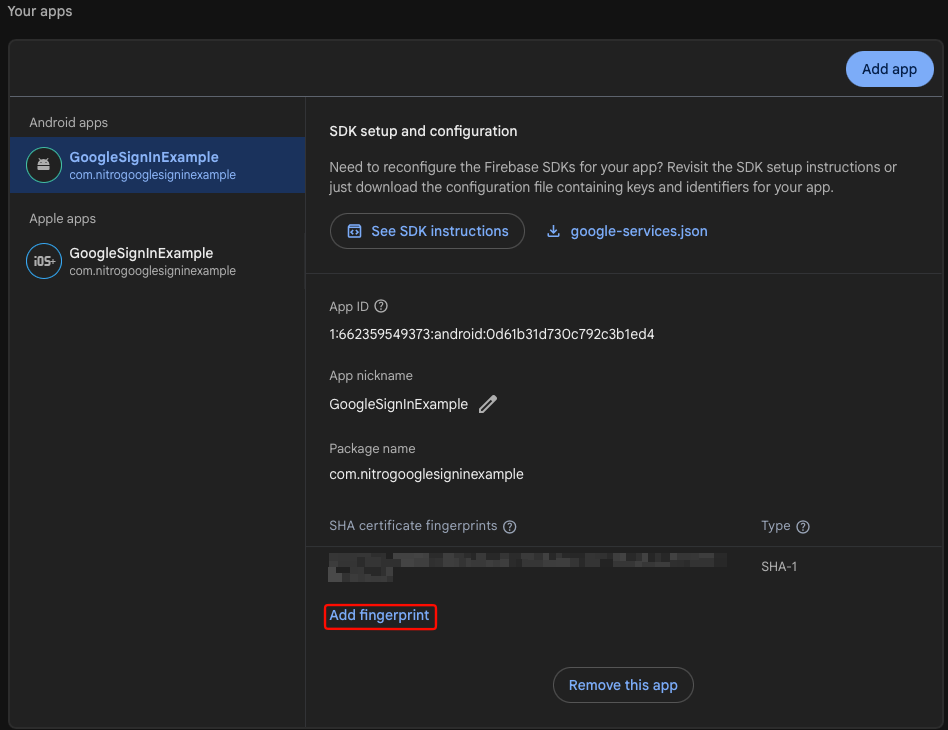
Why: Play Store builds use different certificates. Add release and Play App Signing SHA-1 values before shipping production.
If production sign-in shows the account picker then returns type: 'cancelled', the Play App Signing SHA-1 is almost certainly missing — see troubleshooting.
5. Download config files
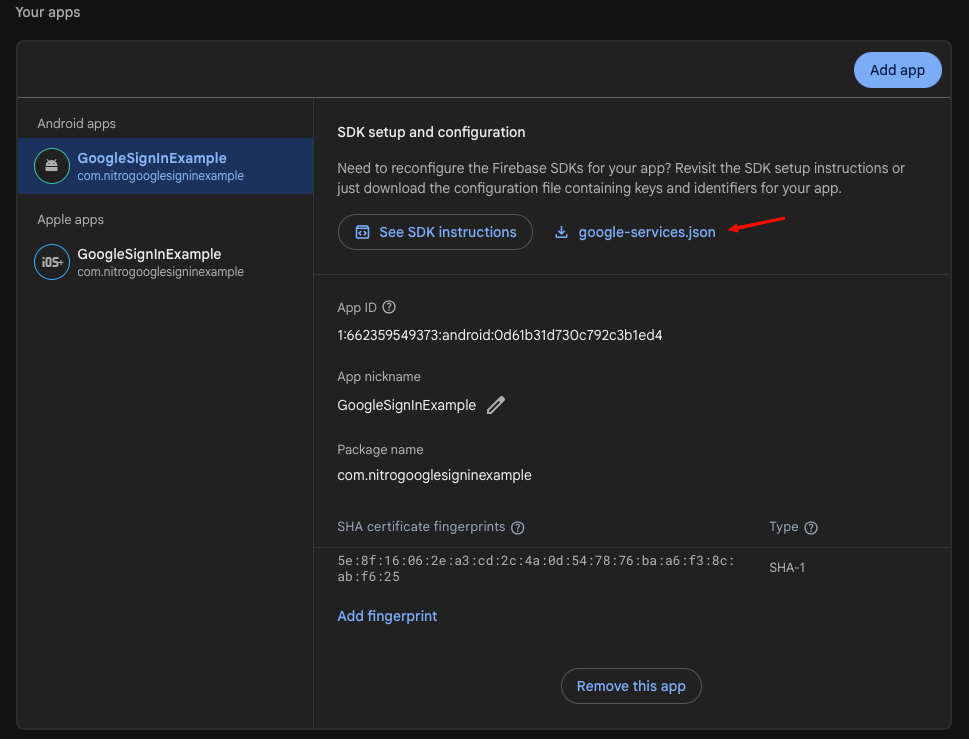
google-services.json (Android)
autoDetect on AndroidWhy: The Google Services Gradle plugin reads this file and generates the default_web_client_id string resource. Native code reads that resource when webClientId is 'autoDetect'.
webClientIdWhy optional: If you pass the Web client ID string in configure(), Android does not need this file — but SHA-1 is still required.
GoogleService-Info.plist (iOS)
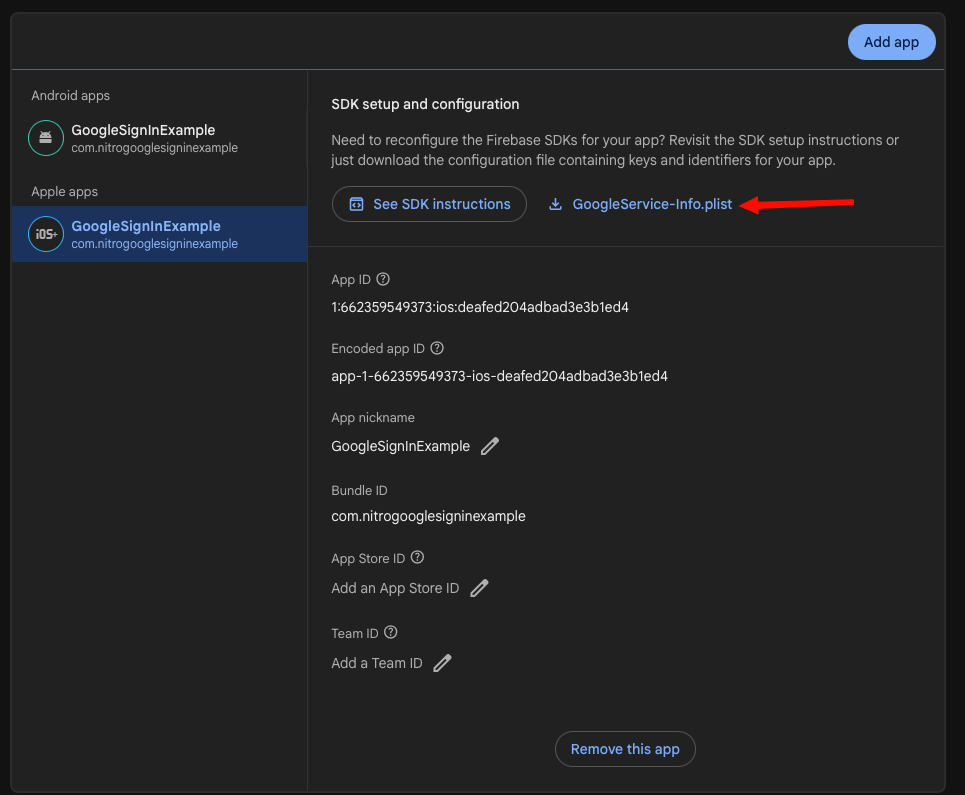
autoDetect on iOSWhy: Native code reads WEB_CLIENT_ID from the plist when using autoDetect. Firebase-generated plists include it.
webClientId onlyWhy optional for client ID: You can pass webClientId in JS instead. You still need the iOS URL scheme (see iOS setup) — the plist is the easiest way to get REVERSED_CLIENT_ID.
From Firebase (recommended path)
Why use it: One console for Android + iOS apps, SHA-1 management, and downloading both files with matching OAuth metadata.
- Firebase Console → your project.
- Add app → Android — package = your
applicationId→ downloadgoogle-services.json - Add app → iOS — bundle ID = your
bundleIdentifier→ downloadGoogleService-Info.plist - Add SHA-1 (§4); re-download JSON if Firebase prompts.
| File | Platform | Provides |
|---|---|---|
google-services.json | Android | default_web_client_id + Gradle integration |
GoogleService-Info.plist | iOS | WEB_CLIENT_ID, REVERSED_CLIENT_ID |
6. Where to put the files
Why: Build tools only read config from known paths. Wrong location = missing resources at runtime.
| Environment | google-services.json | GoogleService-Info.plist |
|---|---|---|
| Bare React Native | android/app/google-services.json | Xcode app target |
| Expo | Path in app.config (e.g. ./google-services.json) | e.g. ./GoogleService-Info.plist |
Repo example/ | example/android/app/ | iOS Xcode target |
Repo example-expo/ | example-expo/ | example-expo/ |
Bare React Native
| Step | Why | |
|---|---|---|
Copy google-services.json → android/app/ | Required for autoDetect | Gradle plugin input location |
| Gradle plugin | Required for autoDetect | Processes JSON into default_web_client_id |
| Plist in Xcode + URL scheme | Required (iOS) | Redirect + autoDetect on iOS |
AppDelegate handle(url) | Optional (recommended bare RN) | Forwards OAuth redirect to GIDSignIn |
Expo
| Step | Why | |
|---|---|---|
googleServicesFile in app.config | Required for autoDetect | Plugin copies files at prebuild |
expo prebuild | Required after native config changes | Applies plugin + Gradle |
| Manual Gradle edits | Optional | Config plugin applies Gradle for you |
| AppDelegate patch after prebuild | Optional | Only if sign-in stalls or you have other URL handlers |
plugins: ['react-native-nitro-google-signin'],
android: { googleServicesFile: './google-services.json' },
ios: { googleServicesFile: './GoogleService-Info.plist' },
7. Verify config files
Why: Catches package name / bundle ID mismatches before long native rebuild cycles.
google-services.json—package_namematchesapplicationIdGoogleService-Info.plist— containsREVERSED_CLIENT_ID;WEB_CLIENT_IDforautoDetect
8. Sample apps in this repo
Why: Only needed if you run the bundled examples. Use package/bundle com.nitrogooglesigninexample or change app configs to match your files.
| App | Config file locations |
|---|---|
example/ | example/android/app/ + iOS Xcode |
example-expo/ | example-expo/ |
9. Link OAuth clients
Why: ID tokens from Android/iOS must correspond to the same Google project as your Web client so your server can verify them with Google's public keys.
Ensure Web, Android, and iOS clients live in the same Google Cloud project.
See also Android setup and iOS setup for platform-specific config file steps.
Troubleshooting
| Issue | Fix |
|---|---|
default_web_client_id was not found | JSON + Gradle plugin + matching package name |
DEVELOPER_ERROR (Android) | SHA-1 / package name |
| iOS redirect errors | URL scheme = REVERSED_CLIENT_ID |
| Expo changes ignored | expo prebuild --clean + rebuild dev client |
Android · iOS · Expo · Troubleshooting.