Android setup
OAuth, SHA-1, google-services.json, and file paths: Google Cloud & config files.
Quick checklist
| Step | Why | |
|---|---|---|
| Android OAuth client (package + SHA-1) | Required | Google validates app identity; missing SHA-1 → DEVELOPER_ERROR |
google-services.json in android/app/ | Required for autoDetect | Source for default_web_client_id |
| Google Services Gradle plugin | Required for autoDetect | Processes JSON into Android resources |
Explicit webClientId in JS | Optional | Replaces JSON + Gradle; SHA-1 still required |
checkPlayServices() before sign-in | Required (Android) | Credential Manager Google ID flow needs Play services on the device |
| Credential Manager + GMS Maven deps in your app | Optional (omit) | Already bundled by this library (see below) |
Expo googleServicesFile + prebuild | Required for autoDetect (Expo) | Config plugin applies Gradle for you |
Release minifyEnabled true | Optional | Consumer ProGuard rules ship with the library — details |
Credential Manager & Google Play Services
Android sign-in in this library uses Jetpack Credential Manager with Sign in with Google (GetGoogleIdOption / GetSignInWithGoogleOption). That is not the same as “password-only” Credential Manager or generic passkeys without Google.
Short answer
| Topic | For this library |
|---|---|
androidx.credentials + credentials-play-services-auth | Already included — do not add duplicate dependencies in your app unless you use Credential Manager for other providers too |
| Google Play Services on the device | Required — call checkPlayServices() before sign-in; use an emulator/system image with Google Play |
Google Services Gradle plugin + google-services.json | Required only for webClientId: 'autoDetect' — not required for GMS itself; see omit section |
| SHA-1 + Web OAuth client ID | Required — use the Web client ID in configure(), never the Android client ID |
What Credential Manager needs (background)
The core androidx.credentials:credentials artifact can handle passwords and third-party password managers without GMS. You only need the Play Services bridge when you want:
- Sign in with Google via Credential Manager (this library), or
- Passkeys on Android 13 and below (Credential Manager backports via Play Services)
Because react-native-nitro-google-signin only supports Google sign-in, the GMS-related artifacts are always part of the native module.
Dependencies shipped by this library
You do not need to copy these into your app’s build.gradle for this package to work — they are declared in the library’s android/build.gradle:
implementation "androidx.credentials:credentials:1.5.0"
implementation "androidx.credentials:credentials-play-services-auth:1.5.0"
implementation "com.google.android.libraries.identity.googleid:googleid:1.2.0"
implementation "com.google.android.gms:play-services-auth:21.6.0"
Why optional: If you also implement your own Credential Manager flows (passwords, passkeys, 1Password, etc.), add matching androidx.credentials versions in your android/app/build.gradle and align versions with the library to avoid duplicate-class issues. For Google sign-in only through this package, add nothing.
Native code passes your Web client ID into GetGoogleIdOption.Builder().setServerClientId(...) — never the Android OAuth client ID:
// Inside the library — use Web client ID from configure() / autoDetect
GetGoogleIdOption.Builder()
  .setServerClientId(webClientId)  // *.apps.googleusercontent.com (Web type)
When you NEED extra project setup (beyond npm install)
| Item | Why | |
|---|---|---|
| Device/emulator with Google Play | Required | credentials-play-services-auth delegates Google ID tokens to Play services on API ≤ 33 |
checkPlayServices() in JS | Required | Surfaces missing/outdated Play services before getCredential fails |
Web OAuth client ID in configure() | Required | setServerClientId must be the Web client; Android client ID → DEVELOPER_ERROR |
| Android OAuth client + SHA-1 (and SHA-256 in Firebase) | Required | Ties your signing cert + package to Google Cloud |
Google Services Gradle plugin + google-services.json | Required for autoDetect only | Generates default_web_client_id; unrelated to adding credentials to your app |
When you can OMIT Google Services plugin and JSON
webClientIdWhy you can omit: google-services.json and com.google.gms.google-services only feed default_web_client_id for 'autoDetect'. If you pass the Web client ID string in JavaScript, skip the file and Gradle plugin entirely.
| Omit | Safe when | Still required |
|---|---|---|
google-services.json | webClientId: 'YOUR_WEB_CLIENT_ID.apps.googleusercontent.com' | SHA-1, Android OAuth client, Play services on device |
Root classpath("com.google.gms:google-services:…") | Same as above | — |
apply plugin: "com.google.gms.google-services" | Same as above | — |
| Firebase Android app in console | You use Google Cloud Console OAuth only | Web + Android OAuth clients |
You cannot omit Play services on the device or the Web client ID when using this library.
When GMS Maven deps are omittable in general (not this library)
Why this section exists: A plain Credential Manager app that only targets Android 14+ (API 34+) and only supports username/password or OS/3rd-party passkeys (no Google button) can skip credentials-play-services-auth. This library is not that use case — Sign in with Google always needs the Play Services auth bridge, which we ship for you.
Implementation checklist (Sign in with Google)
| # | Step | Why | |
|---|---|---|---|
| 1 | Install react-native-nitro-google-signin + react-native-nitro-modules | Required | Brings Credential Manager + GMS artifacts transitively |
| 2 | Register SHA-1 (and SHA-256 in Firebase) | Required | Top cause of DEVELOPER_ERROR when missing or wrong |
| 3 | Create Web + Android OAuth clients in one project | Required | Web ID → configure(); Android ID → package + cert only |
| 4 | GoogleOneTapSignIn.configure({ webClientId: … }) | Required | Web ID or 'autoDetect' |
| 5 | Google Services plugin + google-services.json | Required for autoDetect | Optional with explicit Web ID — omit |
| 6 | await checkPlayServices() before sign-in | Required | Validates device Play services |
| 7 | Rebuild native app after install / Gradle changes | Required | Metro does not apply native dependency or resource changes |
OAuth client
Why: Android sign-in is bound to your applicationId and signing certificate. Google rejects requests from unregistered apps.
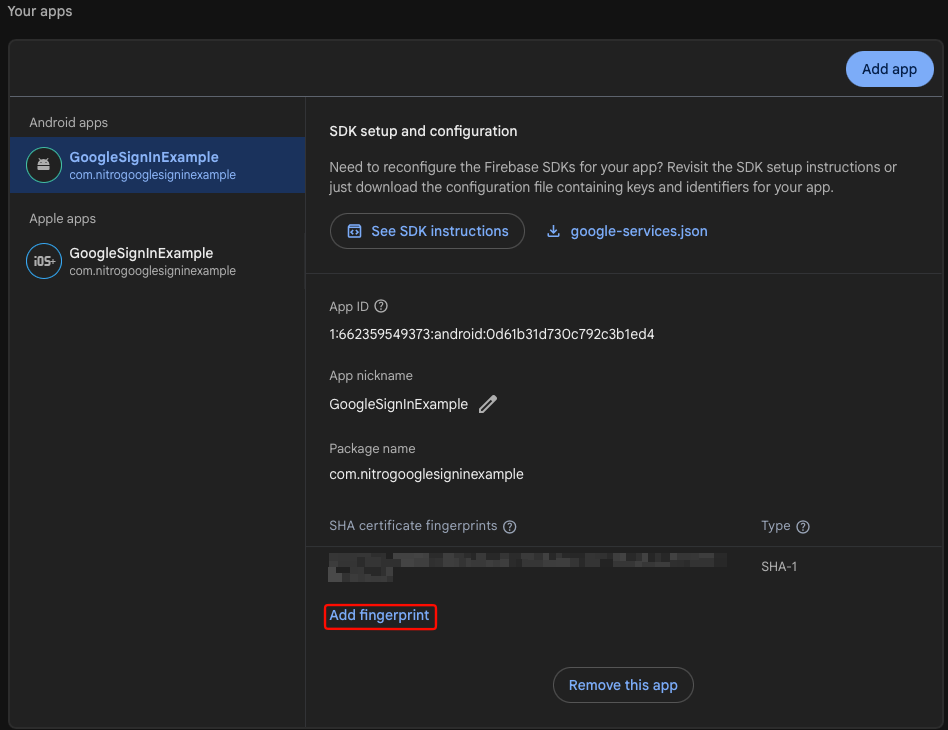
- In Google Cloud, create an Android OAuth client with your
applicationId/ package name. - Add SHA-1 fingerprints for debug and release builds (Google Cloud setup).
Google Services Gradle plugin & google-services.json
Gradle setup for react-native-nitro-google-signin when using webClientId: 'autoDetect':
Path comparison
| Setup | google-services.json | Gradle plugin | webClientId |
|---|---|---|---|
autoDetect (recommended with Firebase) | Required | Required | 'autoDetect' |
| Explicit Web client ID only | Optional | Optional | '….apps.googleusercontent.com' |
Expo + googleServicesFile in app.config | Required for autoDetect | Applied by config plugin on prebuild | Usually 'autoDetect' |
autoDetectWhy: Android reads default_web_client_id from resources. That string is generated when the Google Services plugin processes google-services.json. Without both, native code throws:
webClientId is "autoDetect" but default_web_client_id was not found. Add the Google Services plugin or pass an explicit webClientId.
| Piece | You add in app? | Purpose |
|---|---|---|
credentials + credentials-play-services-auth | No (library) | Credential Manager + Google ID via Play Services |
play-services-auth | No (library) | Legacy/auth helpers used with Google ID library |
| Google Services Gradle plugin + JSON | Only for autoDetect | Writes default_web_client_id — not a substitute for the rows above |
Without google-services.json (explicit webClientId)
Why optional: No Gradle changes if you pass the Web client ID in JavaScript instead of using autoDetect.
You still need:
| Item | Why | |
|---|---|---|
| Android OAuth client + SHA-1 | Required | Certificate validation is independent of webClientId source |
Web client ID in configure() | Required | Native layer needs the Web OAuth client for tokens |
GoogleOneTapSignIn.configure({
  webClientId: 'YOUR_WEB_CLIENT_ID.apps.googleusercontent.com',
})
With google-services.json (bare React Native)
Use this path for autoDetect or Firebase-style config files.
1. Download google-services.json
autoDetectWhy: Gradle plugin input; wrong path = resources never generated.
From Firebase Console (Android app with your applicationId) or Google Cloud. Place it in:
android/app/google-services.json
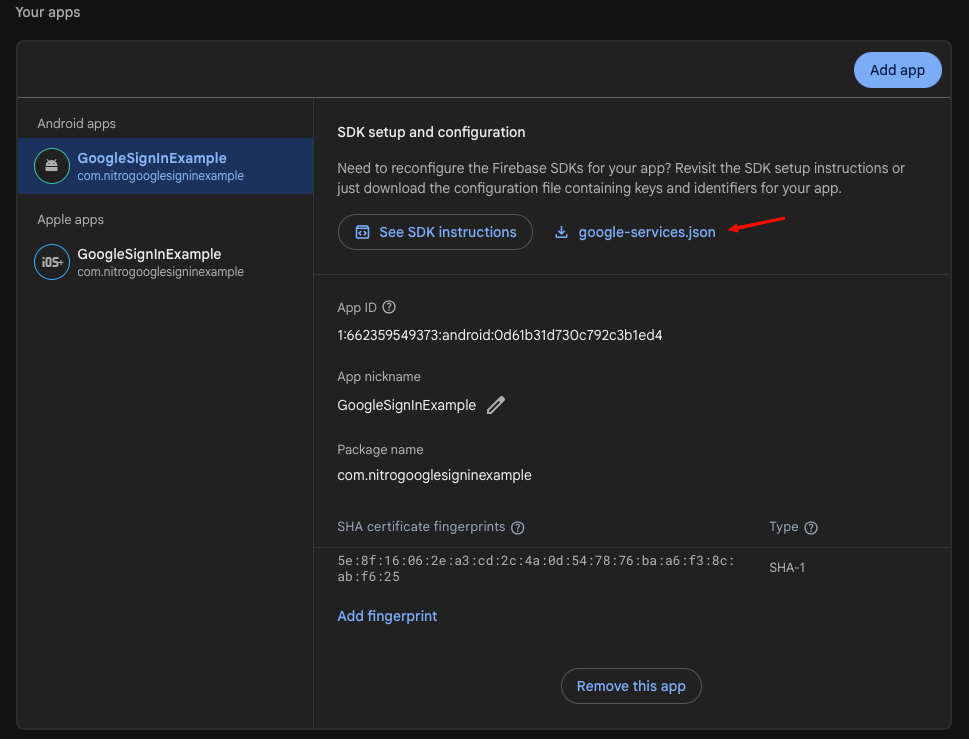
Or from Google Cloud Console when linking an Android app:

Full walkthrough: Google Cloud & config files.
Confirm package_name in the JSON matches applicationId in android/app/build.gradle.
2. Update Gradle files
autoDetectWhy: The classpath loads the plugin; apply plugin: "com.google.gms.google-services" runs the task that writes default_web_client_id.
Root android/build.gradle — add the Google Services classpath in buildscript.dependencies (use 4.4.0 or newer; 4.4.2 is fine):
buildscript {
    ext {
        // …
    }
    repositories {
        google()
        mavenCentral()
    }
    dependencies {
        classpath("com.android.tools.build:gradle")
        classpath("com.facebook.react:react-native-gradle-plugin")
        classpath("org.jetbrains.kotlin:kotlin-gradle-plugin")
        // Google Sign-In / Firebase — required for autoDetect on Android
        classpath("com.google.gms:google-services:4.4.2")
    }
}

apply plugin: "com.facebook.react.rootproject"
android/app/build.gradle — apply the plugin after the Android and React Native plugins (typically at the end of the file):
apply plugin: "com.android.application"
apply plugin: "org.jetbrains.kotlin.android"
apply plugin: "com.facebook.react"

// … android { } and dependencies { } …

apply plugin: "com.google.gms.google-services"
3. Rebuild
Why: Resource generation happens at build time; hot reload does not pick up new default_web_client_id.
cd android && ./gradlew clean
# then run from project root
bun run android   # or npx react-native run-android
See example/android/ for a bare RN project layout (the sample app uses an explicit webClientId in App.tsx, so Gradle plugin is optional there unless you switch to autoDetect).
Expo (Android)
Why optional: With expo.android.googleServicesFile (or plugin options), the config plugin adds the classpath and com.google.gms.google-services during expo prebuild. You do not edit Gradle by hand unless you customize native projects after prebuild.
Configure in JavaScript
// With google-services.json + plugin applied:
GoogleOneTapSignIn.configure({ webClientId: 'autoDetect' })

// Without google-services.json:
GoogleOneTapSignIn.configure({
  webClientId: 'YOUR_WEB_CLIENT_ID.apps.googleusercontent.com',
})
Play Services on the device
Why: Sign in with Google through Credential Manager uses credentials-play-services-auth, which expects Google Play services on the device (especially Android 13 and below). This is separate from the optional Google Services Gradle plugin — you need Play services on the phone/emulator, not extra Maven lines in your app.
await GoogleOneTapSignIn.checkPlayServices()
ProGuard / R8 (release builds)
If you enable code shrinking for release (minifyEnabled true in android/app/build.gradle), R8 must not strip Nitro HybridObjects or the Google Sign-In bridge classes. This library ships consumer ProGuard rules in its AAR (android/consumer-rules.pro). Gradle merges them automatically when you depend on react-native-nitro-google-signin — you do not copy those rules into your app by hand.
What you need to do
| Task | Required? |
|---|---|
Enable minifyEnabled true / shrinkResources on your app module | Only if you already ship a minified release |
Add manual -keep rules for androidx.credentials, googleid, or play-services-auth | No — those AndroidX / GMS artifacts bundle their own consumer rules |
Add manual -keep class androidx.** { *; } | No — broad AndroidX keeps bloat the APK and are redundant |
Keep react-native-nitro-modules as a normal dependency | Yes — Nitro core also relies on JNI; use a current peer version |
| Test sign-in on a release build (not only debug) | Recommended after turning on R8 |
App proguard-rules.pro
Use your app’s android/app/proguard-rules.pro only for your code (Firebase, Retrofit, etc.). Do not duplicate this library’s Nitro keeps unless you maintain a fork.
Example release block (app module):
buildTypes {
  release {
    minifyEnabled true
    shrinkResources true
    proguardFiles getDefaultProguardFile("proguard-android-optimize.txt"), "proguard-rules.pro"
  }
}
Sign-in works in debug but fails in release
- Confirm the crash happens on a release APK/AAB (
./gradlew :app:assembleReleaseor EAS production build). - Ensure you are on a recent
react-native-nitro-google-signinandreact-native-nitro-modules(consumer rules ship with the library). - Remove redundant manual
-keep class androidx.**rules from your app — they can mask real issues and increase size. - If you use a custom ProGuard configuration plugin, verify it does not strip consumer rules from dependencies.
- Capture the release stack trace (e.g.
ClassNotFoundExceptionforHybridNitroGoogleSigninorHybridGoogleSignInButton) and compare with Troubleshooting — release / R8.
Peer react-native-nitro-modules documents its own release keeps; treat both packages as required for minified apps.
Troubleshooting
| Error | Fix |
|---|---|
default_web_client_id was not found | Add google-services.json, apply Google Services plugin, ensure package name matches |
| Sign-in fails / DEVELOPER_ERROR | Wrong SHA-1, package name, or Android client ID used instead of Web client ID in configure() |
| Play Services not available | Emulator image or device without Google Play |
| Duplicate Credential Manager classes | You added androidx.credentials in the app with a conflicting version — align or remove duplicates |
| Sign-in OK in debug, broken in release (R8) | Consumer rules ship with this library; avoid -keep androidx.**; see ProGuard / R8 |
See Troubleshooting.